-
October 19, 2026

-
October 19, 2026

TL;DR: Backslash now discovers local AI models on macOS and Windows and brings them into the same AI inventory, with the same allow and deny controls as remote models. With broad coverage of popular local AI tools, security teams can identify models that operate without cloud API calls, trace them to their endpoints, and govern them without requiring developer setup of Backslash.
A developer can download and run an AI model directly on an enterprise endpoint, with inference processed locally and no prompts sent to a cloud provider. This activity may leave security teams without the signals they typically use to identify AI usage: a vendor account, an API key, or outbound inference traffic visible to network security tools.
This makes local models one of the hardest forms of shadow AI to detect and govern. Security teams may have approved specific cloud-based models, restricted access to others, and established policies for AI use. Yet an employee can introduce a local model that operates outside those controls, even used by an approved agent - but without its usage appearing in cloud service logs or generating an outbound inference signal.
Security teams need to know which models are present and running on which endpoints, and whether they comply with policy. That requires persistent visibility and governance of the endpoint itself.
Backslash’s Local Model Discovery reveals AI models running locally across enterprise endpoints. Local and remote models now appear in the endpoints’ AI inventory, governed by the same policies and allow and deny controls. This brings models that would otherwise remain hidden from network and cloud monitoring into the organization’s AI governance process.
Discovery works out of the box, with no developer setup required. Coverage is broad and includes models associated with Ollama, LM Studio, Jan, GPT4All, the Hugging Face cache, MLX, LocalAI, and llama.cpp on macOS and Windows.
Backslash checks each supported tool’s configured model directory, so a model remains visible and tied to its endpoint even when no AI agent is attached to it. Multiple paths pointing to the same model are consolidated into a single record, while files that merely resemble models are filtered out. If a directory cannot be read, Backslash reports a permission gap, helping security teams distinguish an access limitation from a directory where no model was found.
The workflow brings local models into the existing model governance process:
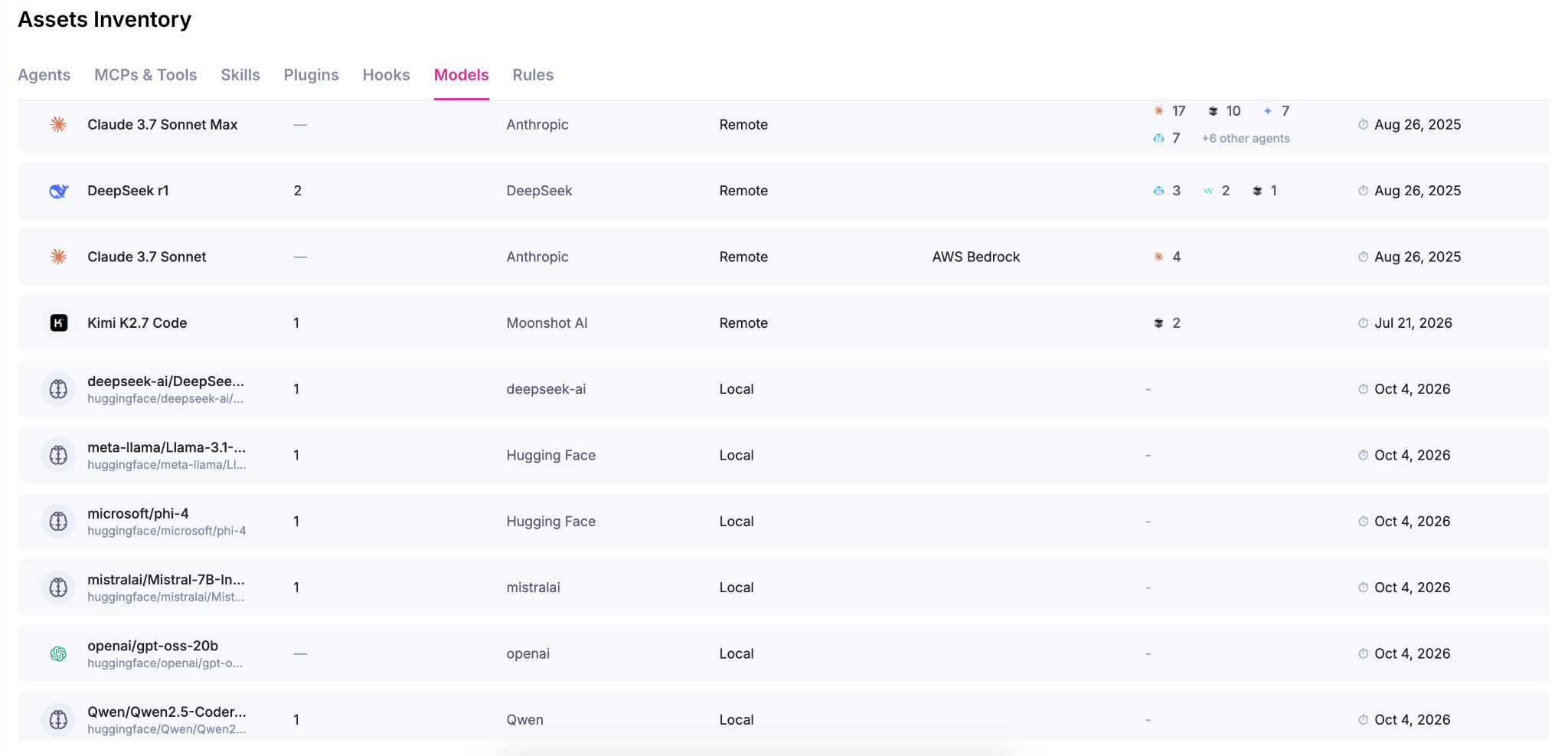
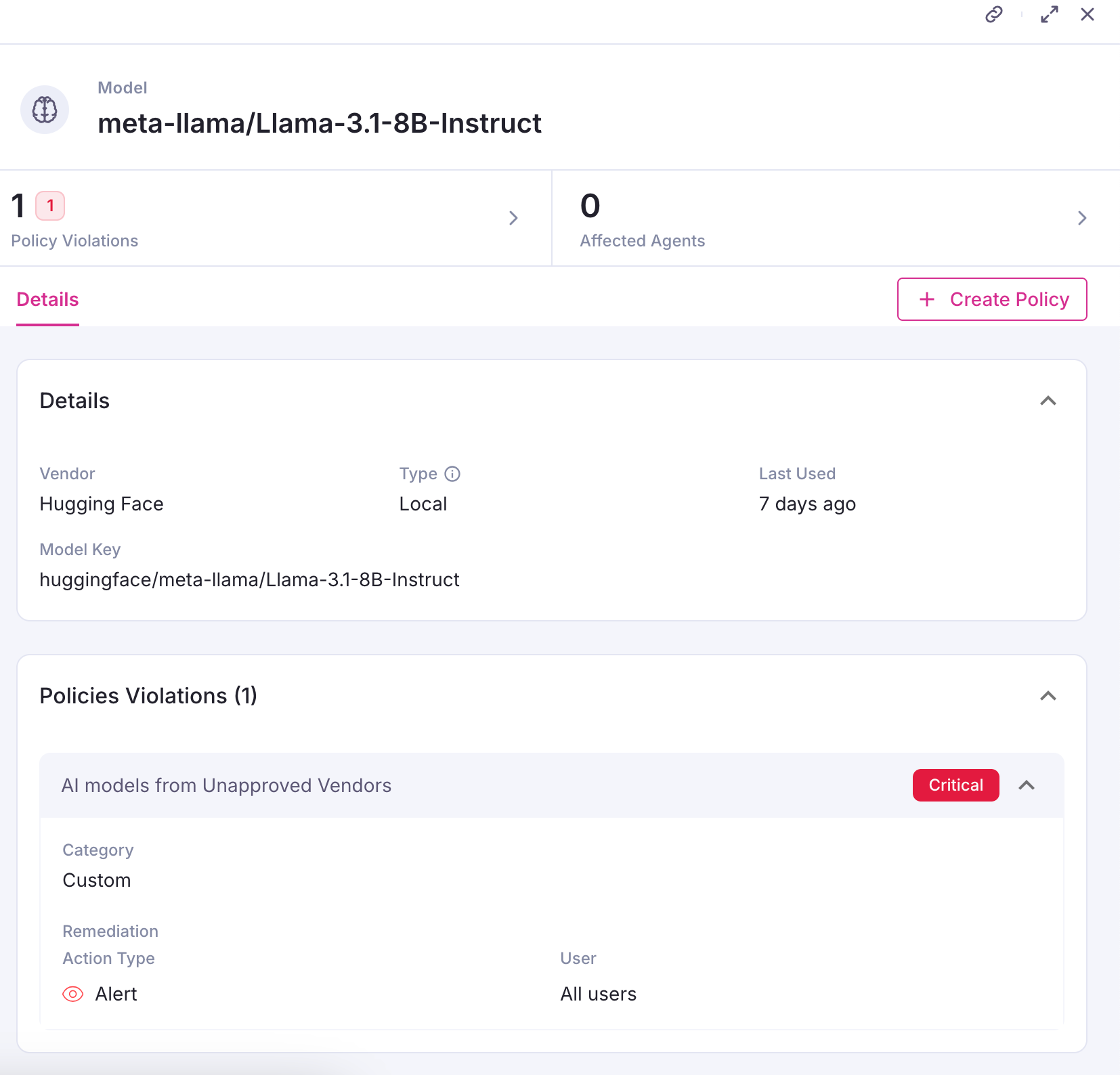
Assess model risk and policy violations. Review the model’s risk details and any policy violations to identify where action is needed.
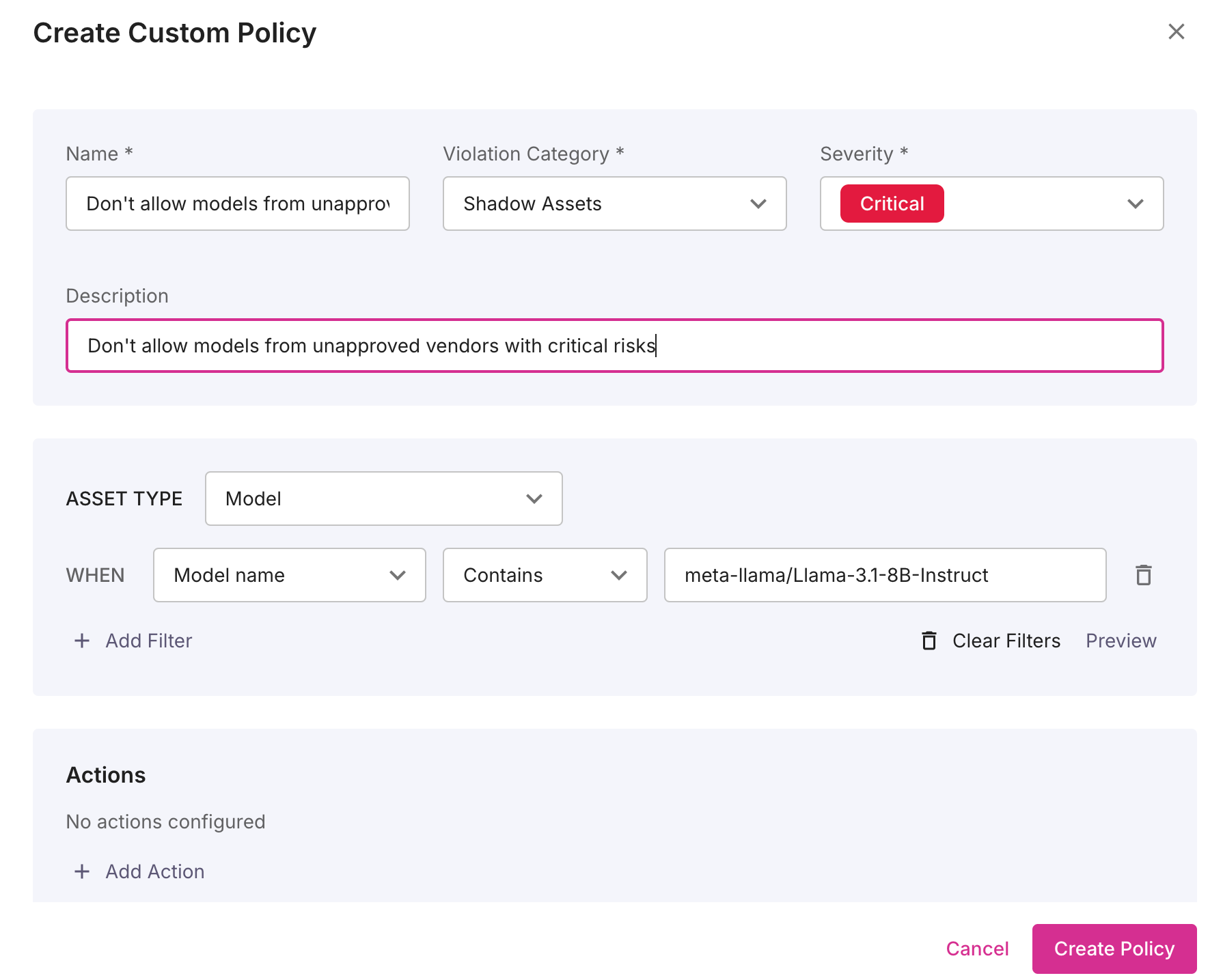
Apply model policy. Add local models to allow or deny lists using the same controls available for remote models.
What Security Teams Gain
AI governance depends on understanding the AI components present across the enterprise, including those introduced directly on employee endpoints. Local Model Discovery completes your visibility and governance across that agentic environment. Alongside visibility into agents, MCP servers, plugins, hooks, and policy violations, Backslash brings another previously difficult-to-observe component into scope.
Security teams can now account for local models, identify their endpoints, and apply model controls through the same governance process used for remote AI. That closes a concrete shadow AI gap and gives teams a more complete foundation for managing agentic risk.
Get your free endpoint exposure assessment.
Local AI runs inference directly on an endpoint instead of sending prompts to a cloud provider. It uses a locally installed LLM/SLM, often from open source projects. When employees introduce local models without organizational approval, those models become shadow AI. Their inference may generate no outbound network traffic, leaving network and cloud monitoring without the signals needed to identify their use.
Backslash finds and evaluates configured model directories through its persistent endpoint agent. Discovered models appear in the AI inventory alongside remote models, with policy violation associations that show security teams risk.
Local Model Discovery supports macOS and Windows, covering models associated with Ollama, LM Studio, Jan, GPT4All, the Hugging Face cache, MLX, LocalAI, and llama.cpp.
Yes. Discovery checks model directories, so a model can appear in the inventory and remain tied to its endpoint even when no AI agent is attached to it.
Yes. Local models enter the same inventory and policy process as remote models. Security teams can add them to allow- or deny- lists to apply organizational model policies.
No developer setup is required for discovery. Backslash’s endpoint agent discovers models associated with supported tools out of the box.
Backslash reports a permission gap. This helps security teams distinguish a directory that could not be inspected from one that was inspected and contained no models.

Maya is a software engineer at Backslash Security.

Backslash Security is the Agentic AI Endpoint Security platform. We enable enterprises to discover, govern, and protect the agentic AI fabric - every AI agent, MCP server, and Skill running on employee endpoints - securing agentic AI at enterprise scale and business velocity.






Privacy is important to us, so you have the option of disabling certain types of storage that may not be necessary for the basic functioning of the website. Blocking categories may impact your experience on the website. More information