Among the 8,000 most popular MCP servers, we found 29% with significant risk

-
September 24, 2026
-
September 24, 2026

MCP servers enable AI agents to take actions. But an MCP server may contain vulnerabilities that expose more access than intended or influence the agent with malicious instructions or prompt injections. Understanding and managing the risks of an MCP server is an essential security practice before connecting it to an enterprise environment.
We recently analyzed the security posture of the 8,000 most popular MCP servers (by number of Github stars), among more than 80,000 that we regularly scan, index and assess on our public MCP Server Security Hub. 29% of the servers analyzed were found to contain at least one risk finding. We are notifying customers so they can assess their exposure, prioritize remediation, and make informed decisions about which servers to allow.
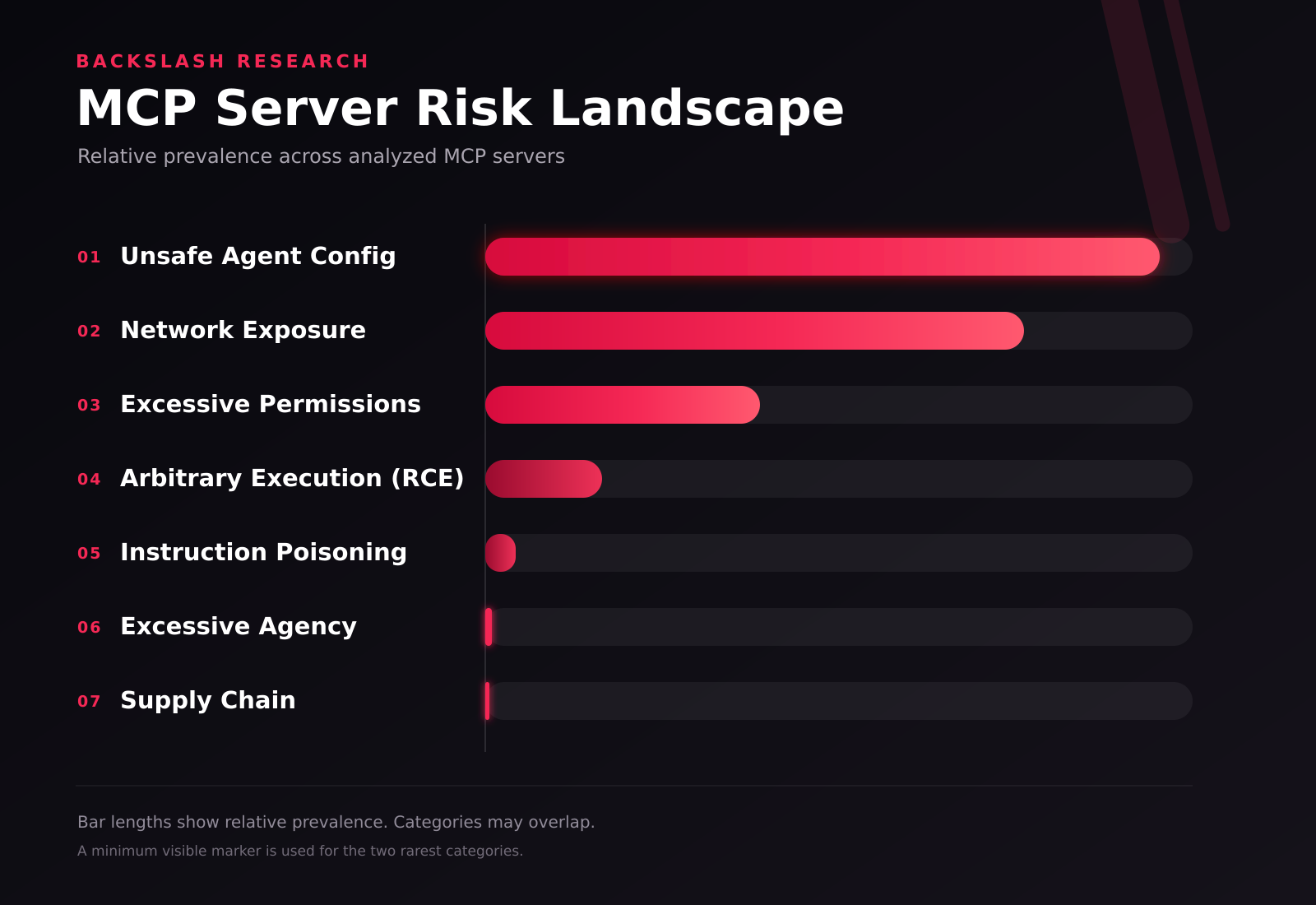
The numbers may give you a good view from 30,000 feet, but in order to really understand what risky means, we took an in depth look at some of the more affected MCPs. So we took a handful of MCPs that exposed remote code execution (RCE) risks – meaning that unauthorized users could run whatever they wanted on connected endpoints – and analyzed them in depth. Each finding was manually reviewed, including the potentially dangerous execution point, the MCP tool schema, and the complete path from client-controlled input to the sink, along with any validation, escaping, allowlisting, or sandboxing mechanisms.
All six of the reviewed findings were unintended security defects in tools that were not supposed to provide arbitrary host-level execution. They might appear to perform ordinary operations, but crafted tool inputs could cause them to execute arbitrary commands with the privileges of the MCP server process.
The exact identity of these MCPs is masked so as not to enable malicious players to exploit them.
6 Confirmed Unintended RCE Findings
Understanding the Impact of These Findings
1. Cloud Resource Tool: Bypassable Python Sandbox
The first server accepted a code_snippet parameter and passed it to Python's compile() and exec() functions. The tool attempted to restrict the submitted code by blocking standard import statements for modules outside an allowlist.
However, the control inspected import statements without also inspecting function calls. Python's __import__() function remained available as a built-in, enabling a crafted snippet to load a prohibited operating-system module and execute host commands. In other words, the sandbox blocked the expected syntax but left another path to the same dangerous functionality open.
The exposure was especially significant because the server created a live cloud session. Successful exploitation could therefore give an attacker access to the same cloud credentials and permissions available to the MCP process.
Practical takeaway: A custom sandbox must account for every route to a sensitive capability, not only the most obvious syntax. Tools that execute model-generated code should also run with strict process isolation, minimal credentials, and explicit approval requirements.
2. Documentation Retrieval Tool: Shell Injection
A documentation retrieval server exposed tools for cloning a repository and fetching documentation files. Client-controlled repository URLs, subdirectories, and file URLs were inserted into shell command strings and executed through /bin/sh -c.
Some values were inserted without quotes, allowing shell separators such as ;, &&, or | to escape the intended operation. Another value appeared inside double quotes, but could still trigger command substitution through $() or backticks. Converting the inputs to strings and checking that they were not empty did not make them safe for shell execution.
Practical takeaway: Do not build shell commands by interpolating untrusted strings. Invoke the executable directly with a separate argument array, validate each input against its expected format, and avoid invoking a shell when it is not required.
3. Container Management Tool: Host Command Injection
A container management server assembled a docker run command from multiple client-controlled fields and executed the resulting string through a host shell. Several values intended to configure the container, including command, platform, network, DNS, hostname, device, user, restart, port, entrypoint, and image settings, could alter the command executed on the host.
The server checked only that an image name was present. It also verified in one execution path that the completed command began with docker, but that check did not prevent additional shell commands from being appended. Even a call that followed the declared tool schema could reach an injectable field.
Practical takeaway: Containers do not protect against injection into the host command used to launch them. Container-management tools should call the Docker binary directly with structured arguments and strictly validate every supported option.
4. macOS Application Launcher: Unsafe Shell Expansion
A macOS application launcher inserted the requested application name and, in one tool, a file path into a command passed to a shell-based execution function. The values appeared inside double quotes, which prevented some basic separator-based payloads but did not stop shell substitutions such as $() or backticks from being evaluated.
The application name was not resolved against an allowlist of installed applications. It was simply used to construct a path under the applications directory. Path normalization did not neutralize shell metacharacters, and no argument-safe process API stood between the tool input and the shell.
Practical takeaway: Quoting a value does not eliminate shell interpretation. Application launchers should resolve requests against approved applications and invoke the operating-system command with a separate argument array rather than a constructed shell string.
5. Apple Shortcuts Tool: Unsafe Command Construction
An Apple Shortcuts server exposed a tool for running a named shortcut with an optional input string. Both values were inserted directly into a shell command passed to a synchronous execution function.
Although the values were enclosed in double quotes, command substitution remained possible. A literal quote could also terminate the quoted value and expose additional shell operators. The server applied no escaping, allowlisting, or independent confirmation before execution.
Practical takeaway: Narrow tool intent does not guarantee narrow behavior. Use a no-shell process API with a separate argument array, validate shortcut names, and require approval when a shortcut can access sensitive resources or perform consequential actions.
6. Website Downloader: Incomplete URL and Path Validation
A website downloader accepted a URL and output path, constructed a wget command, and executed it through a shell. The input validation confirmed only that both values were strings. Although the tool parsed the URL to extract its hostname, it later inserted the original, unescaped URL into the command. The output path was also inserted without safe argument handling.
A crafted value could therefore remain syntactically valid enough to pass the URL parser while still introducing shell control characters when the original string reached the command interpreter.
This vulnerability was previously reported publicly by an independent researcher and assigned a CVE. We independently identified and verified the vulnerability, and further identified the URL parameter as an additional injection vector beyond the originally reported output path.
Practical takeaway: Successfully parsing a string as a URL or path does not make it safe for a shell. Validation must reflect how the value will ultimately be used, and command-line tools should be invoked without a shell whenever possible.
What These Findings Show
An enterprise cannot determine an MCP server's effective capabilities from its name, description, tool schema, or GitHub popularity alone. These can help with discovery, but they are not security controls.
The six servers appeared to expose bounded, task-specific functionality. Following client-controlled data through the implementation showed that each tool could reach a code- or command-execution sink outside its stated purpose. In several cases, basic validation or quoting created the appearance of protection without preventing shell interpretation.
The risk is amplified by the way that MCP servers are used. A vulnerable server does not need to expose a public network listener. If an AI model can be induced (through a poisoned webpage, document, repository, message, or other untrusted content) to call a tool with a crafted argument, the resulting command may execute with the privileges, credentials, filesystem access, and network reach of the local MCP process.
Best Practices for Securing MCP Adoption
MCP security cannot end with a one-time review. Organizations need visibility into what is installed, controls over what is permitted, and protection while MCP tools are running.
1. Continuously Discover Every MCP in Use
Maintain an inventory of local and remote MCP servers across enterprise endpoints. Track where each server is installed, which AI client uses it, who owns it, and what tools it exposes.
2. Vet MCP Servers Before Installation
Assess each server for vulnerable code, malicious instructions, excessive permissions, and supply-chain risks. Do not treat GitHub stars, familiar branding, or a narrow tool description as evidence of security. Educate your developers to distrust by default.
3. Govern MCPs at the Tool Level
A server may contain both low-risk and high-risk tools (specific capabilities that the MCP server activates). Apply policies to individual capabilities instead of approving the entire server by default. Allowlist trusted tools, block unsafe ones, and require approval for sensitive actions such as command execution, credential access, file modification, or data transfer.
4. Limit Each MCP’s Effective Permissions
Run MCP servers with only the filesystem, network, cloud, and operating-system access they require. Isolate tools that execute code or commands, and prevent MCP processes from inheriting unnecessary credentials. Intentional RCE should be treated as a privileged capability, even when the server works as designed.
5. Monitor MCP Activity During Runtime
Pre-installation vetting cannot detect every misuse scenario. Monitor MCP communications and tool calls for prompt injection, tool poisoning, suspicious command execution, unauthorized access to sensitive resources, and potential data exfiltration.
Secure MCP Adoption Requires More Than Trust
MCP servers extend what AI agents can do, but they also extend what those agents can access and execute. As these findings demonstrate, dangerous capabilities may be hidden behind an ordinary tool operation or openly offered as a feature. Enterprises therefore need to evaluate the effective behavior of every MCP server, govern access at the tool level, limit runtime permissions, and continuously monitor activity after deployment.
Explore the Backslash MCP Hub to examine MCP servers and the security findings associated with them.
Common questions
Are MCP servers safe to install?
Not by default. Backslash analyzed the 8,000 most popular MCP servers by GitHub stars, drawn from the 80,000+ indexed on our public MCP Server Security Hub. 29% contained at least one risk finding, and six were confirmed to allow unintended remote code execution. Popularity is not a safety signal.
What percentage of MCP servers have security problems?
29% of the 8,000 most popular ones carried at least one risk finding. Those 8,000 were selected by GitHub stars from more than 80,000 servers we regularly scan, index and assess.
Are the most popular MCP servers safer than obscure ones?
No, and that is why we studied them. We deliberately analyzed the most-starred servers rather than the long tail, on the reasonable assumption that heavy adoption brings scrutiny. Nearly a third still carried a risk finding, and six of the confirmed remote code execution issues were in this group.
Can an MCP server run arbitrary code on my machine?
Yes. We confirmed six unintended remote code execution findings across a cloud resource tool, a documentation retrieval tool, a container management tool, a macOS application launcher, an Apple Shortcuts tool, and a website downloader. Each one allowed commands to reach the host that the server's authors did not intend.
What is the most common way MCP servers get exploited?
Command and shell injection. Most of the confirmed findings came from servers that assembled a command string from user-controllable values and passed it to a shell, rather than calling the executable directly with a separate argument array. The fix in almost every case is the same: avoid invoking a shell when it is not required, and validate each input against its expected format.
Does following an MCP server's declared tool schema keep it safe?
No. In the container management finding, even a call that conformed to the declared tool schema could reach an injectable field. The schema describes the shape of a request, not whether the values inside it are safe when they reach a shell.
Does running an MCP server in a container make it safe?
No. One of our findings was in a container management server that assembled a docker run command from multiple client-controlled fields and executed it through a host shell. Values meant to configure the container - command, platform, network, DNS, hostname, device, user, port, entrypoint and image settings - could alter the command that ran on the host. Containers do not protect against injection into the command used to launch them.Are quoted values in a command safe from injection?
Not on their own. In the macOS application launcher finding, values were inserted inside double quotes, which blocked some basic separator payloads but did not stop shell substitutions such as $() or backticks from being evaluated.How do I vet an MCP server before connecting it?
Check who publishes it, how it updates, whether it carries known vulnerabilities or malicious behavior, and what it can actually reach. The MCP Server Security Hub scores public servers free with no signup. For servers already in use, the harder question is which ones are running at all - most run locally and never appear in network traffic.
We may already be running affected servers. What should we do?
Start with an inventory across your endpoints, then triage by reach rather than by count - a server with broad filesystem, credential or host-command access matters more than one with a narrow scope. We are notifying customers directly so they can assess exposure, prioritize remediation and decide which servers to allow.

Backslash Security is the Agentic AI Endpoint Security platform. We enable enterprises to discover, govern, and protect the agentic AI fabric - every AI agent, MCP server, and Skill running on employee endpoints - securing agentic AI at enterprise scale and business velocity.