-
November 25, 2026

-
November 25, 2026
Every AI coding tool keeps a record of what happens during a session, including what the developer typed, how the agent responded, which files it opened and what each command printed. Some of these logs end up in public GitHub repositories, where anyone can read them.
Earlier this month, Apiiro showed that a single Claude Code settings file, the allowlist that grows every time a developer clicks "don't ask again", has leaked 2,539 secrets to public GitHub. It's solid research, but it focused on one file from one tool under a specific user scenario. So we set out to look at the much larger file that AI coding agents create: the full chat log, across every coding agent we could find, and applying even if users don't check the "don't ask again" option. We wanted to see how many of those files end up on GitHub open repos, with exposed secrets.
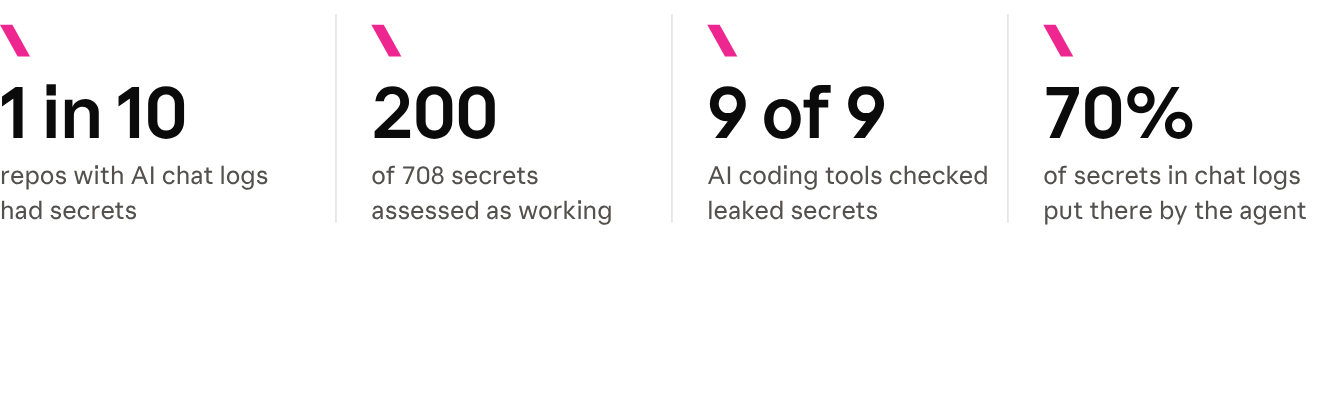
The answer turned out to be 10%.
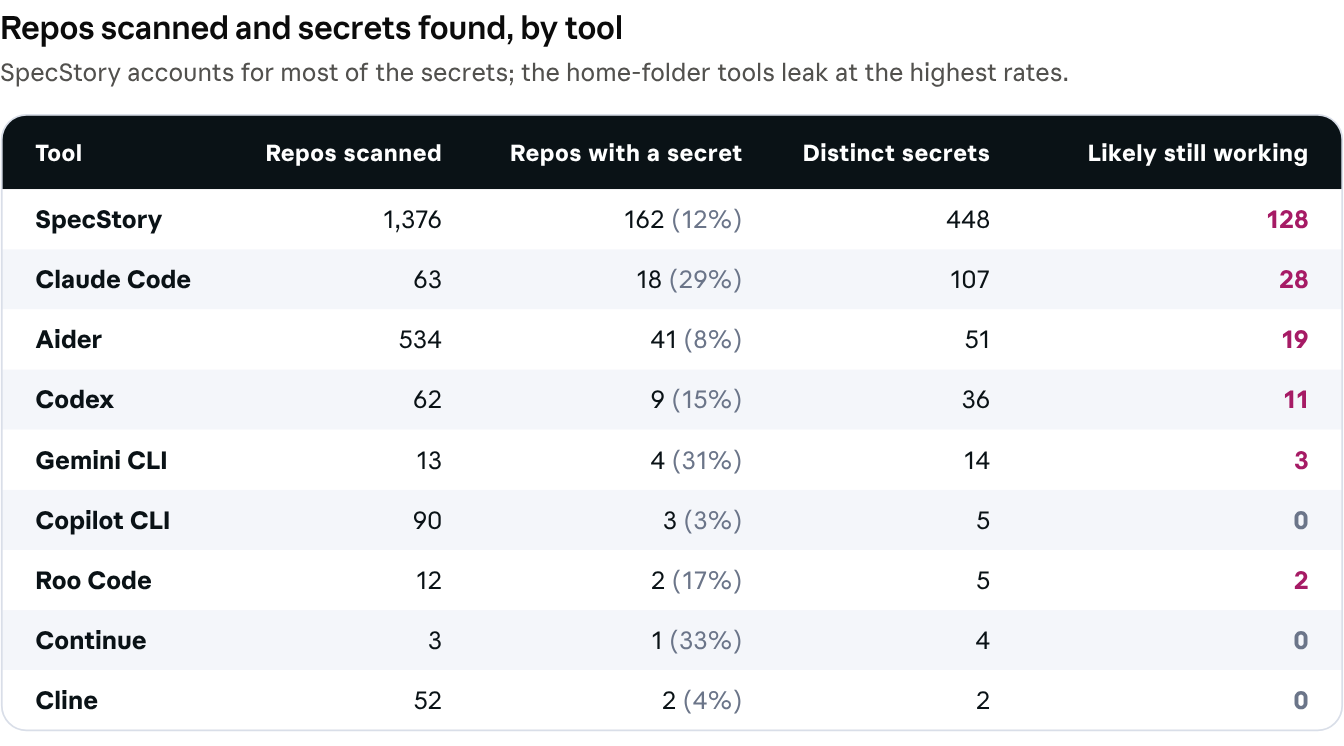
Of the 2,504 public repositories we found holding chat logs from nine different tools, 255 contained secrets (708 secrets in total since some repos contained more than one secret). While we didn't individually check the validity of each secret, based on their appearance in the logs and the absence of error messages, we assess that ~200 secrets were still valid and working.
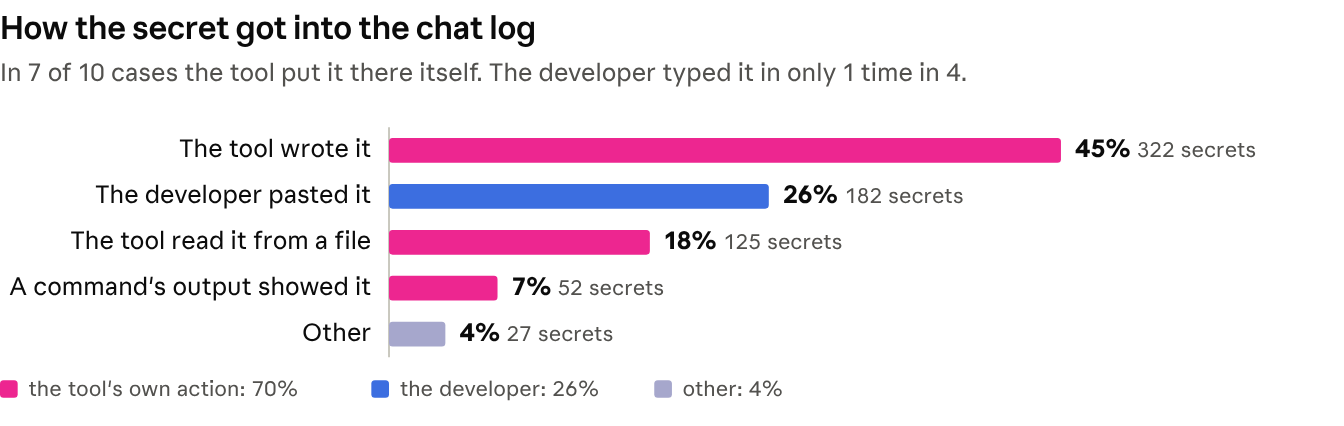
Three out of four secrets made it into the logs through the agent's own work, whether it wrote a key into a config file, read a .env file, or ran a command whose output showed a key. In other words, nobody pasted them into the chat.
The absolute numbers in this research are limited by the search we ran on GitHub, which is by no means exhaustive. It is very likely that there are many more repos on GitHub that harbor such exposed secrets from AI coding tools.
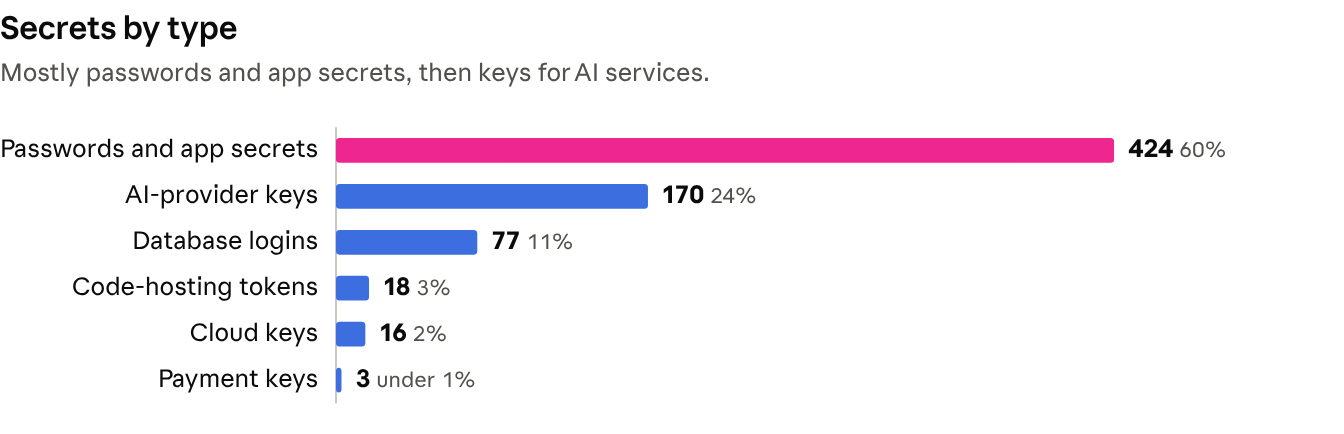
Only 199 of the 708 secrets were in a format that shows which company issued them. For the remaining 509, no vendor is alerted when they're made public, which means nothing could revoke them automatically - but even a known format is no guarantee.
Agents leave other files behind as well, and those leak too: backup copies of edited files, session state, task files and debug logs. These accounted for 77 of the 708 across 25 of the 367 repositories we scanned.
Most of the exposure falls on individual developers: 243 of the 255 affected repositories that we checked belong to personal accounts, and only 12 belong to small organizations.
The closest link to large companies that we found runs through their employees. We found 29 secrets in the personal repositories of developers who are tied to 8 large companies by a work email address or their profile. That doesn't mean that the exposed secrets are necessarily company secrets, but it does mean the agent running on an employee's laptop is part of the company's attack surface, so potentially they could be.
Chat logs record everything by design. When the agent reads a file, the entire file is written to the log, and when it runs a command, the output is saved along with it. None of this is filtered.
The 708 secrets made their way into the logs in five ways:
.env file, and the log kept a copy of its full contents.[embed: node/20741bb7-d187]
This is where each tool keeps its chat logs, and whether they normally sit inside the project folder:
[embed: node/966a01a8-3420]
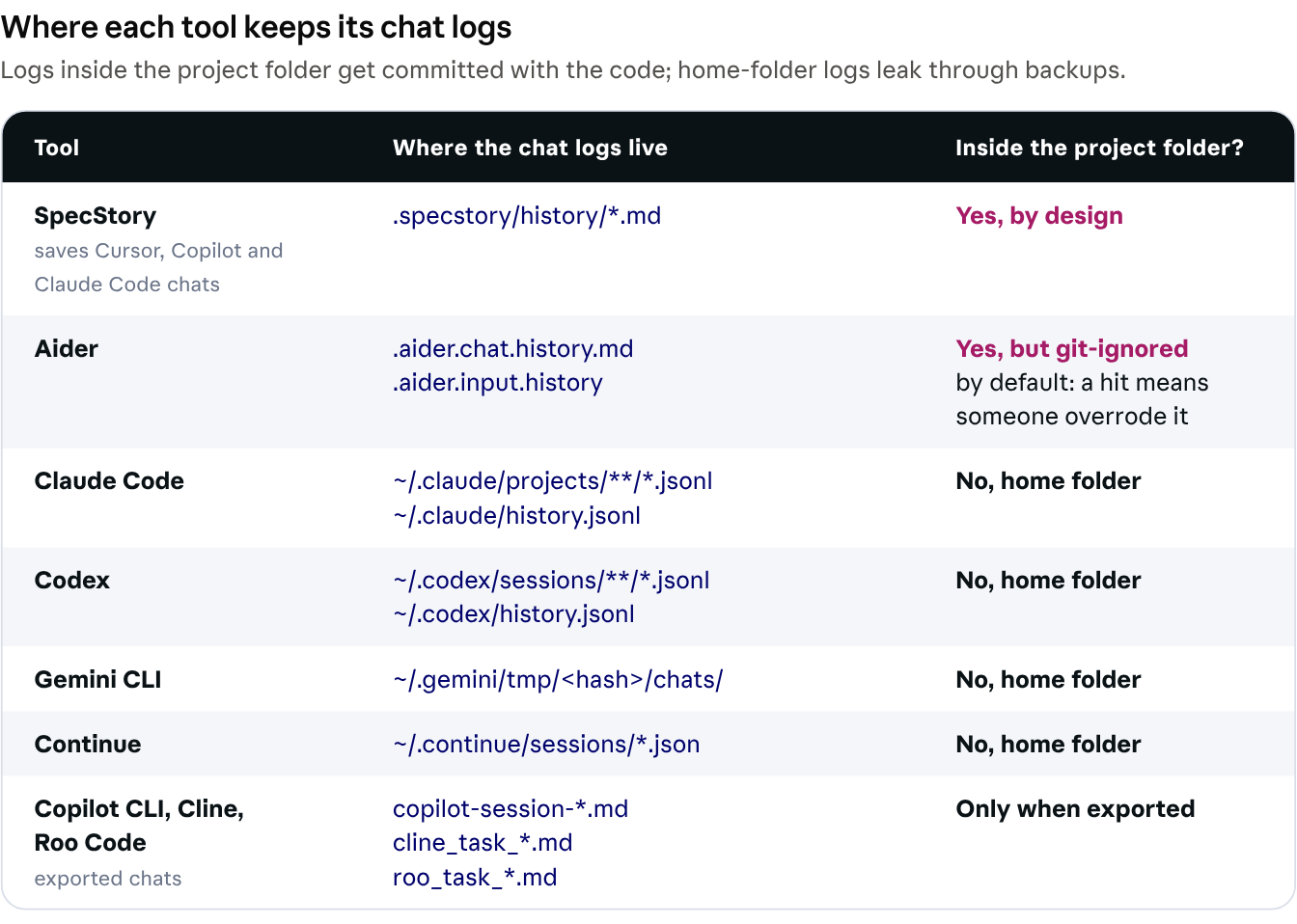
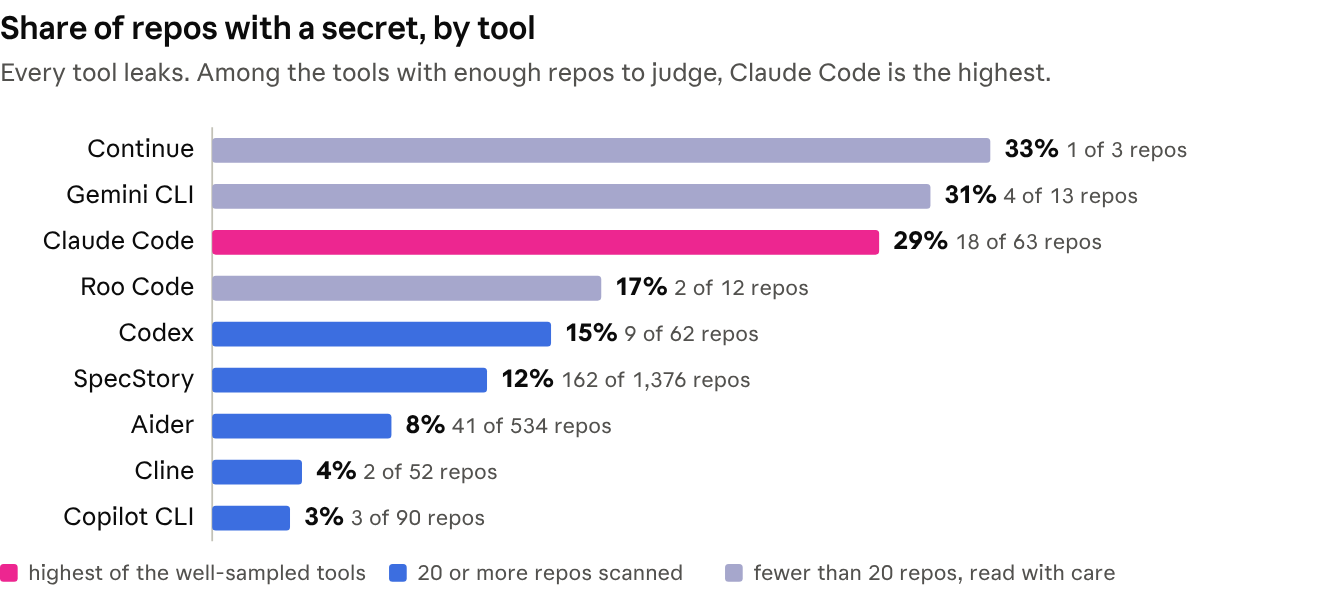
The second path leaks at the highest rate per repo, because a backed-up home folder holds every session from every project the developer has worked on. That explains why Claude Code (29% of repositories) and Codex (15%) leak at higher rates than SpecStory (12%).
Every one of these leaks started on a developer's machine. Most chat logs never leave it, but that doesn't make them safe, since they sit on disk in plain text and can be read by anything running under that user's account. Traditional security tools focus on repositories and pipelines, and they don't see what an agent does on a laptop or what it writes down along the way. That gap is exactly what we work on at Backslash.
Search your repositories. Look for .specstory/, .aider.chat.history.md, .claude/, .codex/, .gemini/ and .continue/, as well as exported chats named cline_task_*.md, roo_task_*.md or copilot-session-*.md.
Check the history, not just the current tree. A log you've deleted is still present in your git history, as well as in every fork and clone made before you deleted it.
Check your dotfiles repository. If you back up your home folder to GitHub, your Claude Code, Codex and Gemini CLI logs may be included, covering every project you've worked on.
If you do find something, rotate the secret first and clean up afterwards.
.gitignore, rather than relying only on your global one.$DB_URL instead of the actual value..specstory/, .claude/, .codex/, .gemini/, .continue/ and exported chats the same way you treat .env files, as places where secrets live, both on laptops and in repositories.We found repositories using GitHub code search by file path, downloaded the agent files along with their full history, and scanned them with gitleaks, TruffleHog and our own rules written for chat logs. Of the roughly 5,700 values the scanners flagged, about 5,000 were discarded on review as placeholders, sample keys or fragments.
The real numbers are almost certainly higher than the ones in this post, because GitHub code search only covers the main branch of each repository and files smaller than 384 KB, and we also skipped very large files and repositories.
We informed the owners of the affected GitHub accounts of our findings, offering a recommended course of action for risk mitigation, and prevention of future leaks.
Exposed working credentials enable unauthorized users to access whatever they protect, be it AI accounts, a database, or a cloud account. Having them on open GitHub repos means that anyone with the will and ability to find them can use them to access those systems.
Coding agents are doing more work on their own, such as reading configuration files, running commands and writing keys into code, and the log records every one of those steps. Developers tend to think of these logs as harmless notes, so they get committed or backed up like any other file.
Not really, since keeping a complete record of the session is the whole point of a chat log. The problem is that nothing checks those files for secrets before they leave the developer's laptop, and that some developers have these files pushed to GitHub either directly or inadvertently via tools such as SpecStory.
No. We never used or attempted to verify the keys. "Likely to be still working" is our assessment based on the logs - we did not test any key. We rated each from its format and the log around it.
Not directly in our findings. We checked 564 large company accounts belonging to the US Fortune 500 plus and some of the largest tech firms, and couldn't tie a single secret to any of them. The connection we did find was through employees' personal repositories, as described above. There's a potential risk that secrets leaked on those personal repos are company secrets, but we couldn't verify it.
Cursor, Windsurf, Zed and Goose store their chat history in database files that GitHub search can't index, so we could not scan those files; we did scan the Zed and Cursor text files that search can see. Cursor chats saved to a project through SpecStory, however, are included.
No. The log is still in your git history and in any forks or clones made before you deleted it, so you need to rotate the secret regardless.

Yossi Pik is the Co-Founder and CTO at Backslash Security, building security for AI-native development and agentic systems. He previously co-founded and served as CTO at Farmigo (acquired by GrubMarket) and was VP at SAP. He runs a team of nine AI agents daily for product, research, and content work, and writes about AI agent security from hands-on experience building and securing agent systems.

Backslash Security is the Agentic AI Endpoint Security platform. We enable enterprises to discover, govern, and protect the agentic AI fabric - every AI agent, MCP server, and Skill running on employee endpoints - securing agentic AI at enterprise scale and business velocity.








Privacy is important to us, so you have the option of disabling certain types of storage that may not be necessary for the basic functioning of the website. Blocking categories may impact your experience on the website. More information